Event Client Portal: Let Clients Choose, Book, and Pay Online
Event Inflow gives every client a customized quote. This allows them to compare your package options, accept your booking terms, and pay online, so you can book events without spending hours on paperwork or chasing payments. After a client books, the same link shows their final event details, balance, and payments.
Updated October 2026 · By Mandi Shoemaker
On this page: How it works · Package options · Terms and payments · Booked event page · Client emails · Who it's for · FAQ
How the client portal works in Event Inflow
- You send the quote. When you email a quote from Event Inflow, it adds a link to the client's quote page.
- Your client chooses a package. They'll compare your package options, see what's included with each, and click Book / Pay on the one they want.
- They accept your terms and pay. On the secure checkout page, they accept your booking terms and choose a payment option from the schedule you set.
- Everything is handled from the same link. Now it shows Your event is booked, with the event details, balance, and payments as they come in.
Package options clients can compare
Event Inflow's quote page shows the event date, a countdown to when the quote expires, and each package option with its rental items, staff, and rental hours, like "1 Craps Table with 2 Dealers" for a casino party company. See details and what's included opens the full package, and your phone number and email are on the page, so clients can reach you with any questions before they book.
You can offer more than one package on a quote, and offer discounts if a client pays by ACH or check. If an option is no longer available, you can Void it. The client still sees it, but can't book or pay for it, and you can email them about the change.
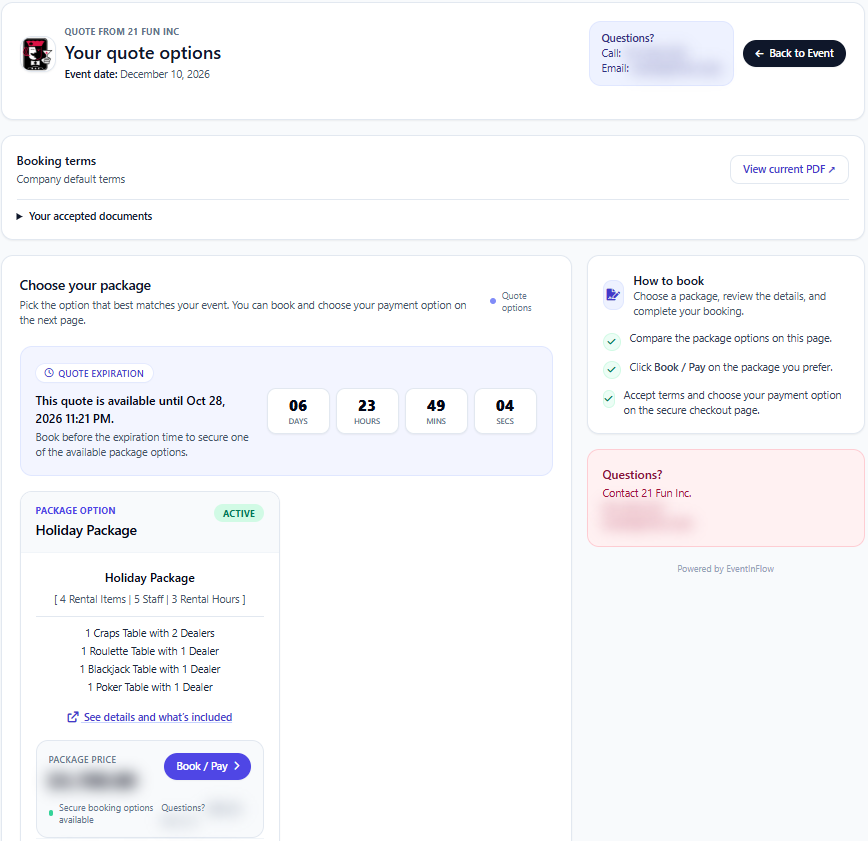
Example: a client's quote page with one package option, with contact details and the price hidden.
Booking terms and payment schedules
Event Inflow shows your booking terms on every quote page with View current PDF, and clients accept them at checkout. Each agreement they accept is saved under Your accepted documents, so you both have a record of what they agreed to.
You set up payment terms once (for example, a 25% deposit when the client books with the balance due 5 business days before the event, or the full amount due 7 days before the event), then choose one for each quote. You can also build a custom schedule of due dates for a single event. The client sees the payment options that match the terms you chose.
Clients can pay online through Event Inflow's secure checkout or choose to mail in a payment. Mail-in clients get an email with the amount, event date, and payment schedule. Bank payments show as pending until they clear.
Show clients their booked event
After a client books, Event Inflow's quote link turns into a page that says Your event is booked. It shows the event date, time, and location, the package they chose with its total, and their Successful payments, Pending payments, and Balance due, with each payment listed by method and date.
Clients can also Log in to view their event details, invoices, payments, and updates in one place.
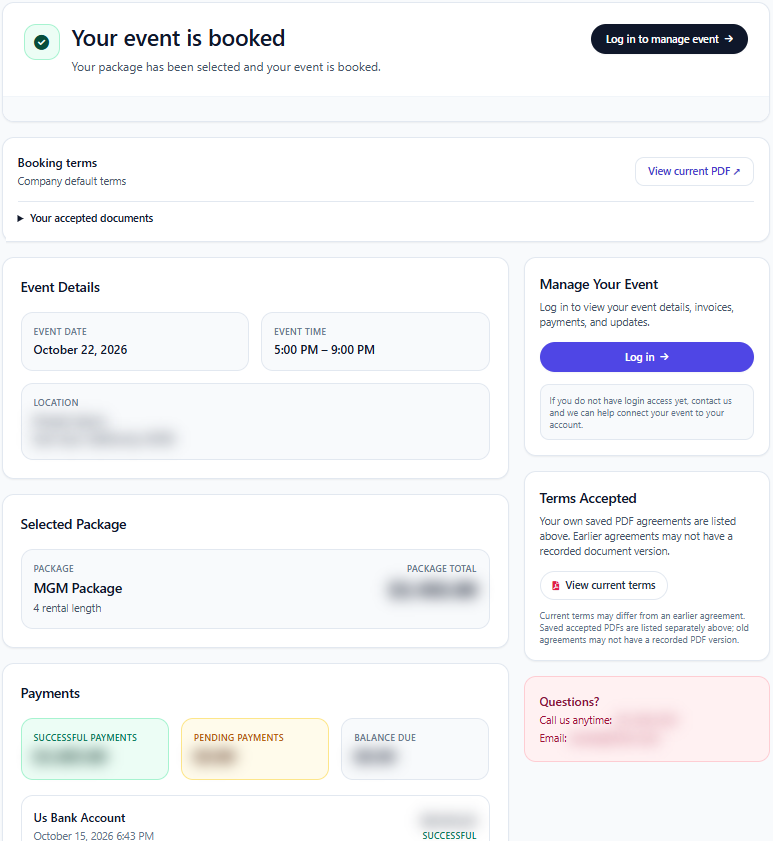
Example: a booked event's client page, with the location and amounts hidden.
Client emails that go out for you
Event Inflow emails clients at each step for you, so you don't have to spend hours on follow-up:
- Quote sent, with the link to their quote page
- A reminder when a quote was sent but the event isn't booked yet, with links to book or decline
- Quote expired, with a way to continue or decline
- Payment confirmations when a payment succeeds, is pending, or fails
- Mail-in payment instructions when they choose to pay by mail
- A payment reminder before the event when a required balance is still due
If a client wants changes, they can Request New Quote from their quote page with an optional message. Event Inflow also emails your team when a client books, pays, requests a new quote, or marks a quote as not booking, so you can follow up right away. You can edit each email template in Email Templates.
For event companies that book clients by quote
Event Inflow's client portal fits casino party, party rental, AV, photo booth, and catering companies, staffing agencies, and anyone else who sends quotes and takes deposits. 21 Fun, a casino party company, has recorded more than 5,000 successful client payments in Event Inflow.
Frequently asked questions
What is an event client portal?
An event client portal is a page where your clients review their quote, book, pay, and check on their event. In Event Inflow, each client gets a link to their own quote page, which becomes their booked event page after they book.
Can clients book and pay without calling us?
Yes. In Event Inflow, clients choose a package, accept your booking terms, and pay at the secure checkout from their quote page.
Can I offer clients more than one package?
Yes. An Event Inflow quote can include several package options, and the client books the one they prefer.
Can clients pay a deposit up front?
Yes. Event Inflow's payment terms let you set a deposit and later due dates, like 25% when the client books and the rest 5 business days before the event, or build a custom schedule for one event.
Can clients pay by check?
Yes. Clients can choose to mail in a payment, and Event Inflow emails them the amount, event date, and payment schedule. A package can also show a lower price for paying by ACH or check.
What happens when a quote expires?
Event Inflow emails the client that the quote expired, with a way to continue or decline, and expired package options can no longer be booked.
Do clients need an account to see their quote?
No. Event Inflow's quote link opens without logging in. Clients can log in to see all of their event details, invoices, and payments.
Every quote, booking, and payment in one place for your clients.
Event Inflow lets clients choose, book, and pay on their own, and keeps them updated until event day.
Related: Event staffing · Event rental inventory · Event team coordination
Last reviewed: 2026-10-22 · Mandi Shoemaker