Event Staffing Software: Staff Every Event From the Quote
Event Inflow builds your crew schedule from every booked quote. The quote lists the equipment and people needed for each event, so Event Inflow can create every shift — from vehicle pickup to breakdown. You review the schedule, then offer the shifts to your preferred available crew.
Updated October 2026 · By Mandi Shoemaker
On this page: How it works · Plan from the quote · Schedule preview · Fill every role · 21 Fun results · Who it's for · FAQ
How event staffing works in Event Inflow
- The client books the quote. Each line on the quote says what the event needs, like "3 blackjack tables with 3 dealers." A note on the quote sets when setup starts, when the event runs, and when breakdown happens.
- Event Inflow builds the crew schedule. Click Preview Auto Plan on the event's staffing page to see every shift, the most people you need at one time, and the labor hours. Nothing on the event changes until you apply it.
- Offer shifts to your crew. Click Offer Shifts. Each person shows as Pending until they answer from My Shifts. Event shift offers covers inviting many people at once and following up until every shift is filled.
Plan your crew when you build the quote
In Event Inflow, every quote includes the equipment and staff needed to run the event. When your client books, those lines become the items and positions you need to fill. Event Inflow adds the delivery, setup, and breakdown crews from your saved settings.
For example, if a casino party event quote includes 3 blackjack tables with 3 dealers, Event Inflow schedules 3 blackjack dealers.
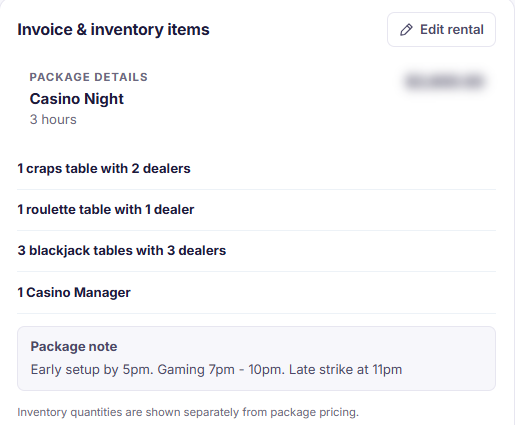
Example: a booked casino night quote.
See every shift, staff member, and labor hour in one view
In Event Inflow, you set up Auto Schedule & Staffing once. Tell Event Inflow what you provide, how long loading, setup, and breakdown take, and which roles do each step. Event Inflow adds travel time from your warehouse and builds the schedule from there.
For a 3-hour casino night with five gaming tables, the preview called for 7 event staff and 32.33 labor hours across 11 steps, from vehicle pickup to vehicle return. Bigger events get bigger crews automatically. If you've already scheduled some shifts, Event Inflow keeps them.
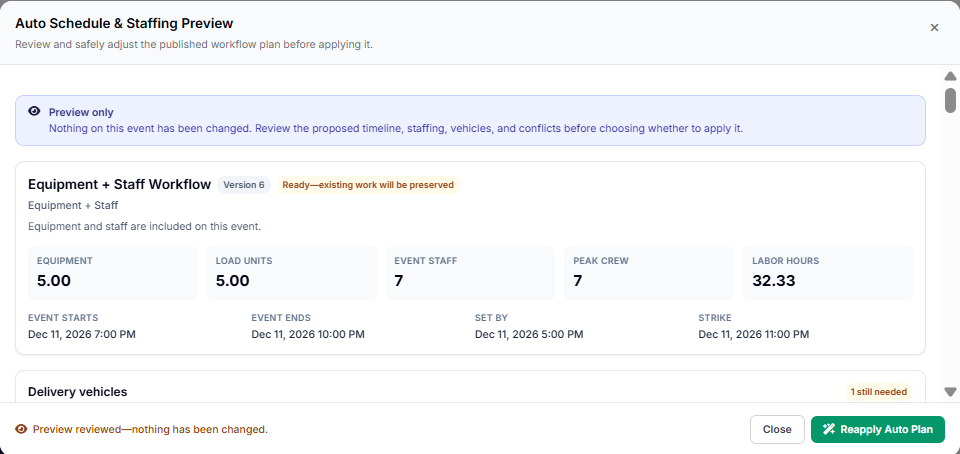
Example: the schedule preview for that casino night.
Fill every role from one screen
Event Inflow groups shifts by role, so you can see at a glance how many people each job needs and who's been offered each shift. The available staff list shows each person's pay rate, last shift, next shift, and past declines, so you can pick who to offer first.
Event Inflow also lets you rank your staff. You create your own ranks, like Elite, Reliable, or In Training, describe what each one means, and give each person a rank. Sort the available staff list by rank to offer your most important events to your best people first. A rank can also be set to Do not staff for people who stay in your records but shouldn't be offered shifts.
The Pending Shifts page shows every unanswered offer across all your events, and each event shows the pay for everyone you've assigned, next to the event's staffing budget.
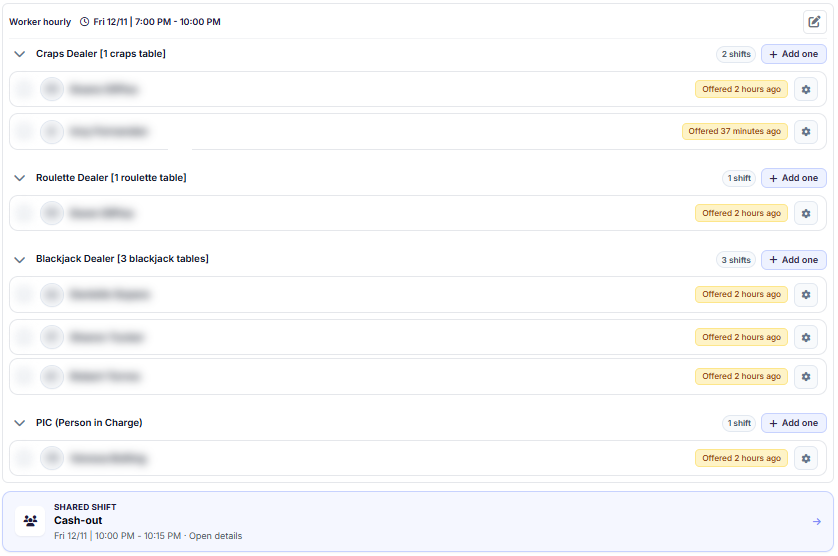
Example: dealer shifts for that casino night, with offers sent.
21 Fun tripled revenue without tripling staff
21 Fun, a casino party company, tripled its revenue in its first two years on Event Inflow without tripling its staff. It has booked 901 events in Event Inflow so far in 2026.
"You send a quote, the client books it, and the quote already knows how much staff and inventory you need. You click one button, and it creates all the positions for you to staff."
— Mandi Shoemaker, COO, 21 Fun
21 Fun is Event Inflow's founding customer. Its COO, Mandi Shoemaker, co-founded Event Inflow.
Built for every event company that requires gear or a crew
Event Inflow asks what you provide for events and sets up your staffing around it. If you do more than one, set up each.
- If you rent equipment. Party rental, tent, and inflatable companies, or any business that delivers gear without staying for the event. Event Inflow schedules your delivery, setup, and collection crews.
- If you provide equipment and staff. Casino party, AV, photo booth, and game rental companies. Event Inflow schedules the crew that delivers the gear and the dealers, technicians, attendants, or operators who work the event.
- If you provide event staff. Staffing agencies and catering teams. Event Inflow schedules the people you send to work events.
Frequently asked questions
What is event staffing software?
Event staffing software schedules the people who deliver, set up, and work your events, then tracks who accepted each shift. Event Inflow builds those shifts from every booked quote, so the schedule is built for you.
Does Event Inflow schedule setup and breakdown crews too?
Yes. Event Inflow's schedule covers every step you set up, such as vehicle pickup, loading, delivery, setup, a team meeting, the event itself, breakdown, unloading, and vehicle return.
Can I change the schedule before it goes to my crew?
Yes. Event Inflow's schedule preview shows the proposed timeline, staffing, vehicles, and conflicts without changing the event. You can adjust it, apply it, and still add or edit shifts afterward.
Can I rank my staff?
Yes. In Event Inflow, you create your own staff ranks, like Elite, Reliable, or In Training, and give each person a rank. You can sort available staff by rank when you offer shifts, and a rank set to Do not staff marks those people as not available for staffing.
How do staff accept shifts?
When you offer a shift in Event Inflow, it appears under Offers in the staff member's My Shifts page. They accept or decline there, and you see their answer on the event's staffing page.
Can I see payroll cost before I offer shifts?
Yes. Each event in Event Inflow shows the pay for everyone you've assigned, next to the event's staffing budget, and the preview shows total labor hours before you apply the plan.
Can staff clock in through Event Inflow?
Yes. In Event Inflow, staff clock in to the shift or position they're starting, or add their hours, from Staff Scheduling & Time Tracking. You review hours in Time Review.
Every booked quote comes with a crew schedule.
Event Inflow builds your crew schedule from the quote, so your team knows where to be as soon as the client books.
Related: Event scheduling · Shift offers · Team coordination · Inventory control
Last reviewed: 2026-10-15 · Mandi Shoemaker