Event Staff Payroll: Pay Every Crew Member for Every Shift
Event Inflow calculates payroll for everyone who works your events. It takes the hours from each person’s shifts, adds their tips, bonuses, and reimbursements, and shows the total for each person and each event. You review it, finalize it, and pay each person by Venmo, check, or your payroll provider.
Updated October 2026 · By Mandi Shoemaker
On this page: How it works · Pay by shift · Tips, bonuses, and reimbursements · Busy-day bonuses · Employees and contractors · Event costs · Who it's for · How 21 Fun pays its crew · FAQ
How event staff payroll works in Event Inflow
- Your crew works their shifts. Hours come from the shifts on each event's schedule. When staff clock in or add their hours, you check them in Time Review.
- You review the payroll period. Open Payroll and pick the week. You'll see total payroll for every event, and you can open any event to see each person's pay.
- Finalize and pay. Click Finalize this payroll period. Then pay each person through their payment method, or click Export CSV to send payroll to your payroll provider.
Know exactly what each person earned, shift by shift
In Event Inflow, each person's pay is broken down by the shifts they worked, accounting for different roles and hours. Shift pay, reimbursements, bonuses, and tips are totaled separately, so you can see exactly where every dollar comes from.
For example, a casino party dealer who also drives and sets up equipment gets separate lines for loading the vehicle, delivery, setup, dealing, and breakdown.
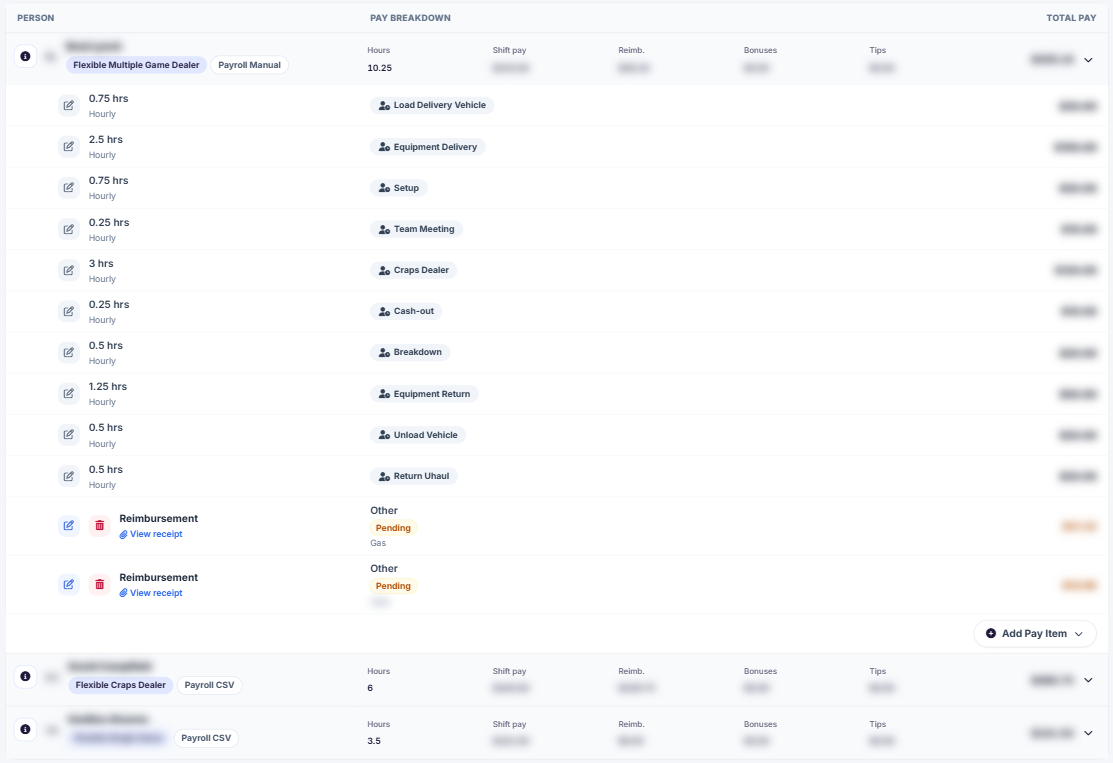
Example: one worker's pay for a casino party event.
Tips, bonuses, and reimbursements in one payroll
In Event Inflow, you can add a tip, bonus, or reimbursement to anyone's pay with Add Pay Item. Staff can submit expenses with a receipt, including parking, tolls, mileage, and supplies, and each one shows as Pending until you review it.
You choose who can submit each expense type, such as delivery staff only for mileage (and set the mileage rate, which can change by date range).
Busy-day bonuses that apply automatically
Event Inflow's Peak Day Bonuses let you set bonus programs for busy dates, like December weekends, for all staff or only certain roles. When more than one bonus matches, each person gets only the highest one per event, so bonuses never stack. You can preview projected bonus totals before you run payroll.
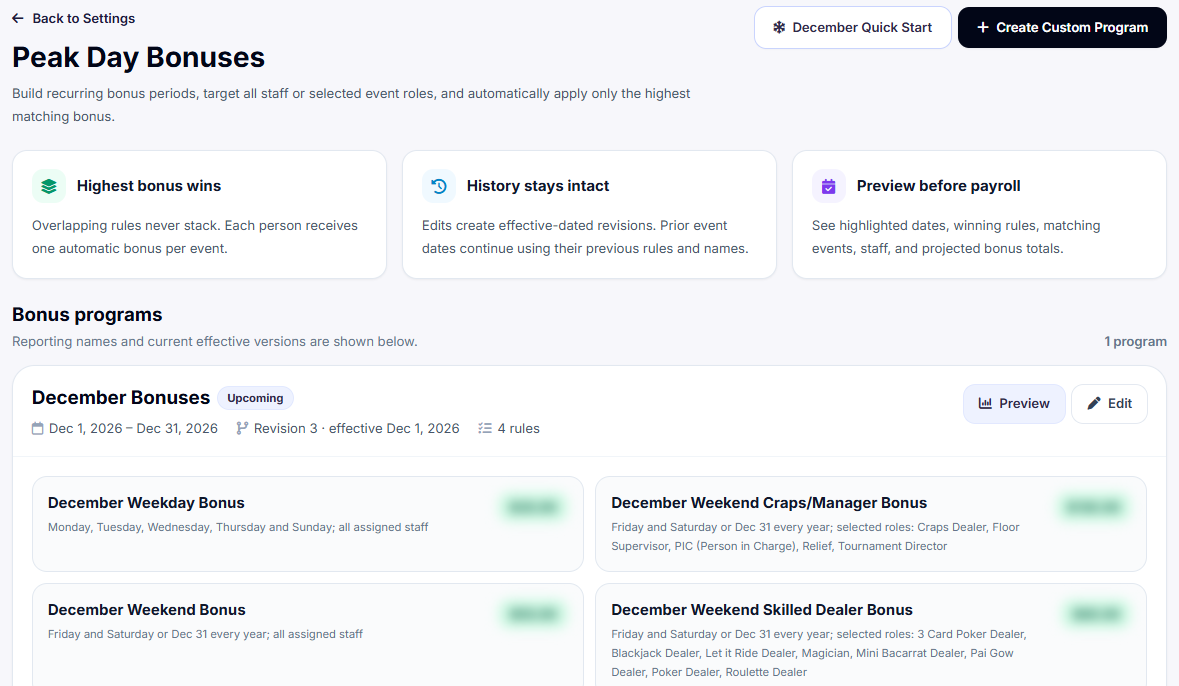
Example: a December bonus program for a casino party company.
Employees or contractors, paid the way each one prefers
Each staff profile in Event Inflow records whether the person is an Employee or a Contractor, their default hourly rate, and how they get paid: Cash App, Check, PayPal, Venmo, Zelle, or through your payroll provider.
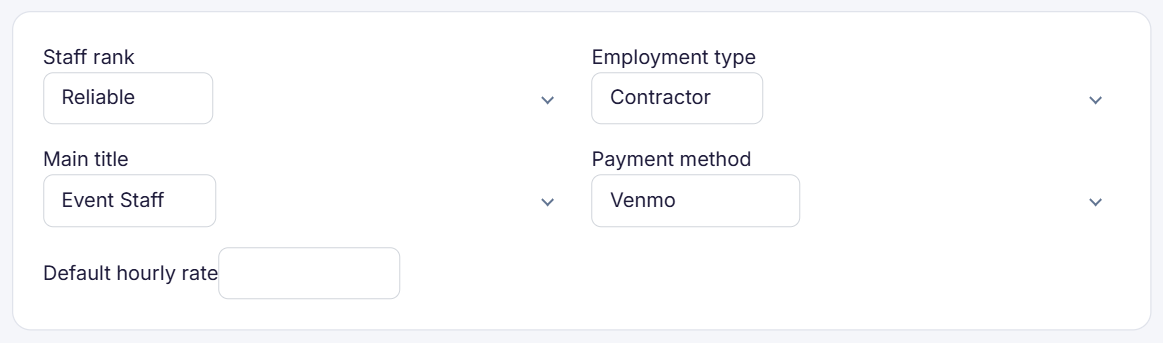
Example settings for one staff member.
Know what every event costs to staff before payday
Event Inflow's Payroll page shows each event's hours, payroll, gross revenue, and estimated profit side by side. Each event's staffing page also compares the pay for everyone you've assigned with the event's staffing budget, so you can spot an event that's over budget before payday.
For event companies that pay crews by the hour or by the event
Event Inflow payroll fits casino party, party rental, AV, photo booth, and game rental companies, staffing agencies, caterers with on-call servers, and everything in between.
How 21 Fun pays every dealer and driver
21 Fun, a casino party company, pays everyone who works its events through Event Inflow's payroll, from delivery drivers to dealers. In its first two years on Event Inflow, it tripled its revenue without tripling its staff.
Frequently asked questions
What is event staff payroll software?
Event staff payroll software calculates what you owe the people who work your events, including hourly shift pay, tips, bonuses, and reimbursements. Event Inflow builds each person's pay from the shifts they worked on your schedule.
Does Event Inflow pay my staff directly?
Event Inflow calculates each person's pay and records how they get paid. You pay them through their payment method, such as Venmo, Zelle, or check, or export a payroll CSV for your payroll provider.
Does Event Inflow handle employees and contractors?
Yes. Each staff member in Event Inflow is set as an Employee or a Contractor, along with their payment method and default hourly rate.
How are tips handled?
In Event Inflow, you add a tip to anyone's pay with Add Pay Item. Tips appear in their own column on the Payroll page.
Can staff submit expenses for reimbursement?
Yes. Staff can submit parking, tolls, mileage, supplies, and other expenses with a receipt. You decide who can submit each type and set the mileage rate in Event Inflow's Reimbursement Settings.
Can I run payroll weekly or daily?
Yes. Event Inflow's payroll cycle can be weekly or daily, and you choose the day the payroll week starts and your pay day.
Your schedule is already your payroll.
Event Inflow turns every shift into pay, so payroll matches the events your team worked.
Related: Event staffing · Event scheduling · Invoicing
Last reviewed: 2026-10-15 · Mandi Shoemaker