Event Delivery Management: Every Drop-Off, Driver, and Vehicle in One Place
Event Inflow keeps every event's delivery details together: the location and access notes, the warehouse the equipment comes from, the drivers and their delivery shifts, and the vehicle they'll use. A Daily schedule shows every delivery, return, and loading shift across your events, so you can see when additional drivers, vehicles, or delivery time are needed.
Updated October 2026 · By Mandi Shoemaker
On this page: How it works · Location and access · Crew pickup details · Routing · Daily schedule · Vehicles · Who it's for · FAQ
How event delivery works in Event Inflow
- Set the location and warehouse. Event Inflow stores every event's address, access details, and the warehouse its equipment comes from.
- Schedule the delivery crew. Auto Schedule & Staffing uses the invoice, warehouse travel time, and your loading, setup, and breakdown times to prepare the shifts.
- Pair drivers with vehicles. The Daily schedule shows each driver's delivery shifts and flags any that still need a vehicle.
- Load the truck. Event Inflow builds a load list for each driver and warehouse so nothing is ever forgotten or missed.
Location and access details for every event
Event Inflow's Location & access section shows the event's address on a map, with Get directions links to Google Maps and Apple Maps so you can pull up the route in one tap. It also records the region and zone (the service areas you set up, like Miami or Broward), the location type, whether there's an elevator or stairs, and the environment, so you can plan how to get the equipment in safely and efficiently before your crew arrives.
Below it, the Warehouse section names the warehouse the equipment comes from, with its address, gate code, lock code, and notes, like gate hours.
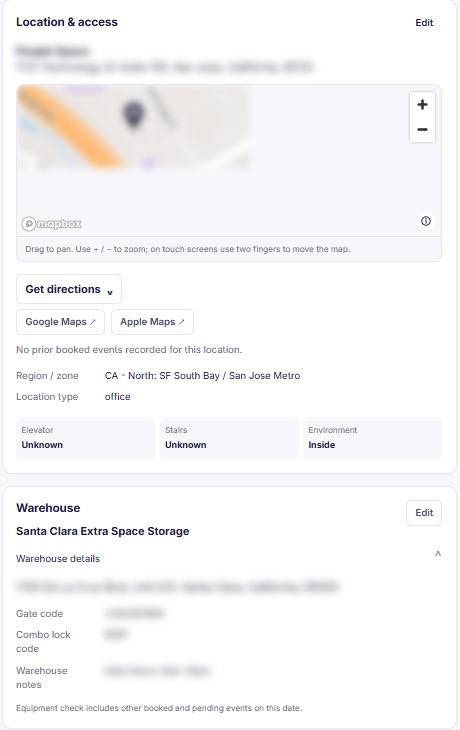
Example: an event's location and warehouse details, with the address and access codes hidden.
Event Inflow also keeps a record for each venue. Its default parking, loading, and unloading instructions become the starting instructions for new events at the venue (and you can still change them for individual events as needed). Venue records also hold recommended parking garages and lots, and contacts from places like the loading dock or front desk so you never have to gather those details again.
Pickup details on your crew's shift page
When a staff member has a shift like loading the delivery vehicle, their Event Inflow shift page lists the event's equipment, where to pick it up (the warehouse address, gate code, and lock code), and any vehicle assigned to them. It sits on the same page as Before You Go, the schedule, and the event notes, so your crew has everything they need for the day in one place.
Delivery routing and travel time
Event Inflow's Auto Schedule & Staffing works out how long the drive takes from your warehouse to the event and back. It looks up the drive time between the two addresses online, or applies a set number of minutes you choose. The drive is scheduled to end when setup begins, so your crew leaves early enough to arrive on time. If it can't find a drive time, Event Inflow uses a set number of minutes instead.
Each event in Event Inflow shows its address on a built-in map. When it's time to drive, Get directions opens the route in Google Maps or Apple Maps, so your driver can follow it straight to the venue.
See every delivery on one daily schedule
Event Inflow's Daily schedule, under Load vehicles, shows a column for each day with every event's delivery work:
- The warehouse the equipment leaves from
- Whether a vehicle is assigned
- Each delivery driver's shifts, like picking up a rental truck, delivering equipment, bringing it back, and returning the truck
- The event's timeline, from loading the vehicle to unloading it
Each event also flags anything that's missing with labels like Driver needed, Travel time needed, Loading time needed, or Vehicle pairing needed, and you can filter to events that need a vehicle. Drivers come from the delivery shifts on your staff schedule.
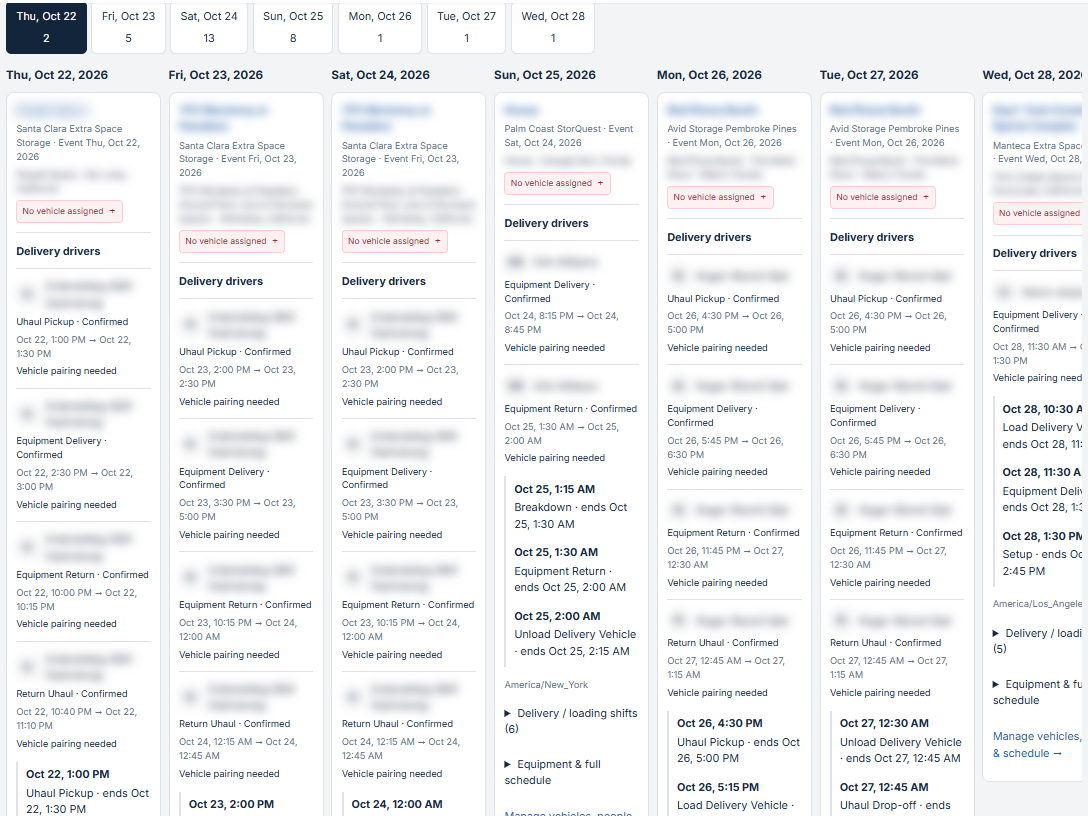
Example: a week of deliveries, with staff and event names hidden.
Track owned, rented, and staff vehicles
Event Inflow's Vehicles page lists every vehicle your team uses and who owns it: Rented, Tenant-owned, or Staff vehicle.
- Rentals store the rental provider, the pickup and drop-off times, and the reservation number.
- Company and staff vehicles list the vehicle's owner.
- Rental Providers are saved with the areas they serve.
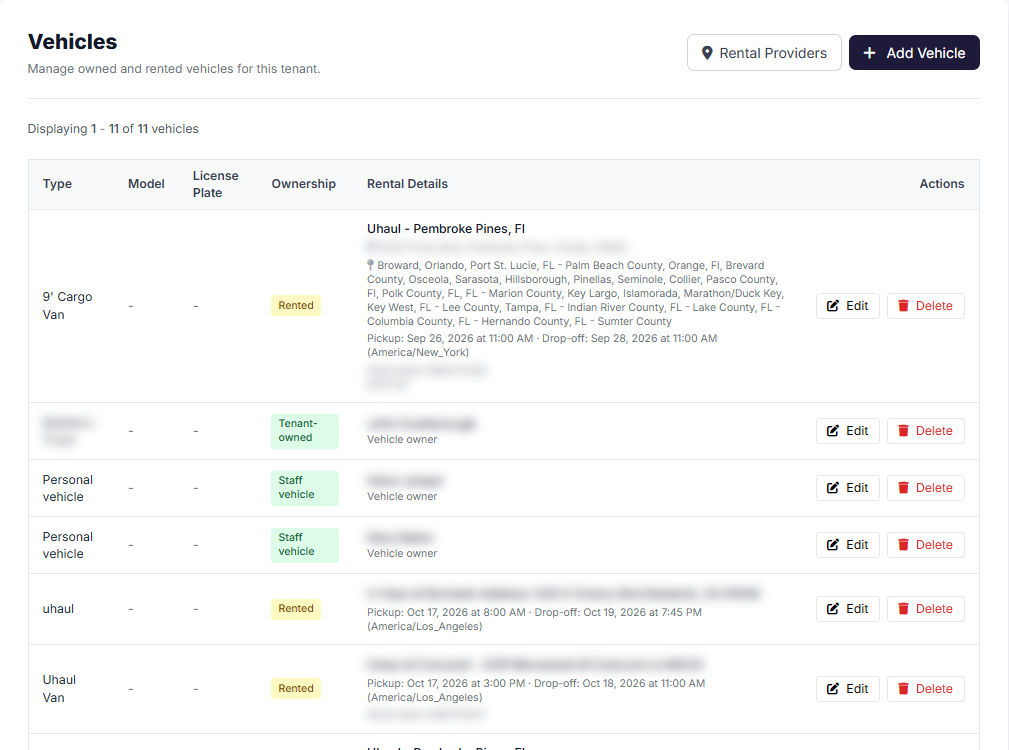
Example: a vehicle list with rented, company-owned, and staff vehicles, with names, addresses, and costs hidden.
For event companies that deliver and set up gear
Event Inflow delivery management fits casino party, party rental, AV, and photo booth companies, and anyone else who brings equipment to an event. 21 Fun, a casino party company, delivers tables with rented trucks, company trucks, and staff vehicles, and tracks all of them in Event Inflow.
Frequently asked questions
How does Event Inflow know when my delivery crew needs to leave?
Event Inflow's Auto Schedule & Staffing times the trip from your warehouse to the event and back, by looking up the drive time online or using a fixed number of minutes you choose. It adds your loading, setup, and breakdown times to prepare each event's shifts accurately.
Can I see which deliveries still need a vehicle?
Yes. Event Inflow's Daily schedule marks driver shifts that don't have a vehicle with Vehicle pairing needed, and you can filter to events that need one.
Can I track rented trucks?
Yes. Event Inflow saves each rental with its provider, pickup and drop-off times, and reservation number.
Where do I keep warehouse gate codes?
Event Inflow shows the warehouse's gate code, lock code, and notes in the Warehouse section of each event that uses it. Staff who pick up the equipment also see the gate and lock codes on their shift page.
Can I get directions to an event?
Yes. Event Inflow's Location & access section links to Google Maps and Apple Maps for easy delivery to the event's address.
Every delivery, driver, and vehicle, in one place.
Event Inflow shows you what's going where, who's driving, and what each delivery still needs ahead of event day to keep your business running smoothly.
Related: Event staffing · Event rental inventory · Event staff scheduling · Event team coordination
Last reviewed: 2026-10-22 · Mandi Shoemaker